Split every cost. Know exactly who owes what.
Money is where group trips go wrong. Someone fronts the hotel, someone else covers dinner, three people send half-remembered PayPal requests a month later. Vacationist tracks every shared cost as it happens - so settling up takes seconds, not spreadsheets.
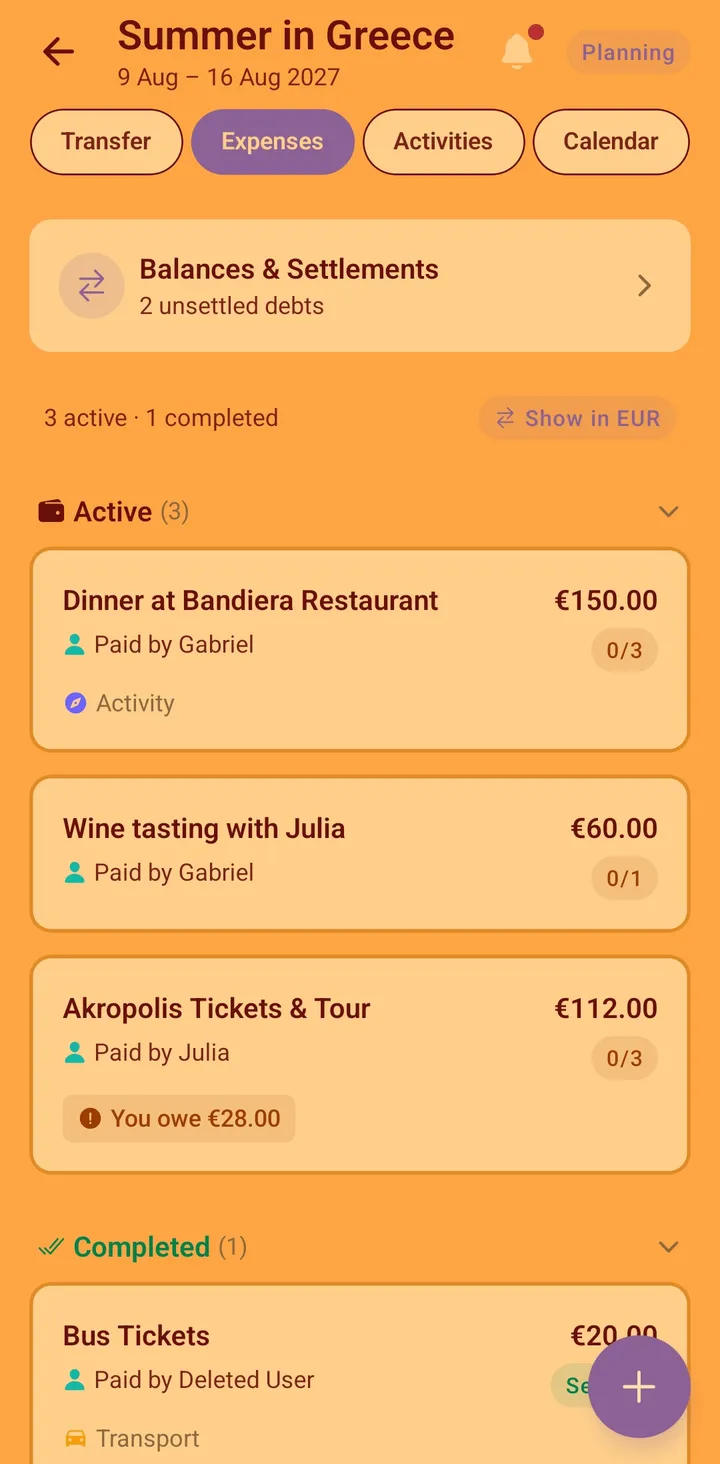
How expense splitting works
Log any group cost - accommodation, dinner, fuel, tickets, groceries - and choose who paid and who it covers:
- Add the expense with an amount, a category, and an optional note - right when it happens.
- Attach the receipt - a photo or PDF, straight onto the expense while it's still in your hand.
- Pick the payer - whoever actually put their card down.
- Split it - equally across everyone, or with custom amounts when someone skipped the wine or joined late.
- Balances update instantly for the whole group. Everyone always knows where they stand.
At the end of the trip, the Balances screen leads with your balance - what you'll pay or receive - followed by the simplified settlement plan: the fewest transfers that clear the whole group. Individual member balances are one tap away when you want the detail. Multi-currency expenses show the exchange rate used, right there in the breakdown, so a converted amount is never a mystery number.
Built for trips, not just bills
Plenty of apps split bills. Vacationist splits bills inside the trip you're already planning together, which changes what it can do:
- Expenses tied to the trip. Every cost lives with its trip - no mixing up the Croatia balance with your flatmate's electricity bill.
- Everyone's already there. Because the group planned the trip in Vacationist, nobody has to install yet another app just to owe you money. Guests who joined by invite link participate in expenses too.
- Vacation spending at a glance. The trip overview shows total and per-person spending as the trip unfolds, plus a category breakdown - accommodation, transport, food, activities - so an over-budget week has an obvious cause. The Analytics tab carries it further: your own share of every trip you've taken, year by year.
- Offline first. Log expenses in the mountains, on the ferry, wherever. They sync when you're back online.
Fair splits for real situations
Real trips are messier than "divide by six." Vacationist handles the usual cases:
- Custom amounts - the person who slept on the sofa pays less for the cabin.
- Partial participation - split dinner among the five who were there, not all nine.
- Multiple payers over time - balances net out across all expenses, so if you paid for fuel and I paid for groceries, we might already be even.
Receipts, attached to the expense
The receipt for a group cost is only useful if someone can find it later. In Vacationist it lives on the expense itself:
- Photograph or attach it as you pay - one or more images or PDFs per expense, up to 10 MB each.
- Everyone on the trip can view it - no forwarding, no "can you send me that again."
- Only the uploader or the organizer can replace or remove it - so a shared receipt doesn't get changed out from under the group.
Receipts go into private, access-controlled storage restricted to your trip's members. This is separate from the encrypted travel document vault - receipts don't carry the passport-grade encryption, because a dinner receipt isn't a passport. What matters is that they're private to the trip and they don't vanish into a camera roll.
Expensing a work trip
If the trip is for work - a team offsite, a client visit, a conference with colleagues - the group split is only half the job. You also need a report you can file.
Mark any cost as a business cost as you record it - not only expenses, but accommodations, flights, rental cars, and public transport too. When it's time to claim, export a business expense summary: a per-person report that merges all of those sources, itemised by date, category, and payer, with links to the attached receipts. Amounts in different currencies are converted for you. Only committed bookings are included - a hotel or flight the group is still voting on won't appear in an employer-facing report. On the web you get both a PDF and a Markdown file; in the app you get the PDF. The receipt links stay valid for 30 days - long enough to submit and have the claim processed. See the corporate offsite planner guide for the full workflow.
Plan your next group trip with Vacationist
Vote on activities, split expenses and attach receipts, and keep everyone in sync - free, no ads, and friends can join without an account. Available on iOS, Android, and the web.
Frequently asked questions
Is expense splitting free?
Yes. Expense splitting - including receipts and the business expense report - is part of the free Vacationist app, with no ads and nothing about expenses paywalled.
Can I attach a receipt to an expense?
Yes. Add one or more photos or PDFs (up to 10 MB each) to any expense. Every trip member can view them; only the person who uploaded a receipt, or the trip organizer, can replace or delete it.
Can I export expenses for a work reimbursement?
Yes. Flag the relevant costs as business costs - expenses, accommodations, flights, rental cars, or public transport - and export a per-person business summary as a PDF (plus Markdown on the web), itemised by date, category, and payer, with links to the receipts. Amounts in other currencies are converted in the report.
How does the exchange rate work for expenses in another currency?
Expenses logged in a currency other than the trip's are converted using a stored daily rate, and the rate that was applied is shown in the expense breakdown - so a converted figure is always traceable, not a black box.
Do my friends need an account to be included in expenses?
No. Anyone who joins the trip via invite link can be part of expense splits as a guest. That removes the biggest friction in group expense tracking - the one person who refuses to install anything.
How is this different from Splitwise?
Splitwise is excellent at pure debt tracking across all areas of life. Vacationist covers the expense splitting a trip needs plus everything around it: activity voting, a shared calendar, accommodations, packing lists, and chat. For a group trip, that means one app instead of four. See the full Vacationist vs. Splitwise comparison.
Can I track my own spending, not just shared costs?
Yes. The trip overview shows the trip's spending picture including your personal share, and the Analytics tab totals your share across every trip you've taken, grouped by year.