Getting there, sorted - flights, cars, trains, and tickets.
The plan is agreed, the dates are set, and then someone asks "wait, how are we all actually getting there?" Suddenly there are four booking references in three different chats, two people on a different flight, and nobody knows who's in which rental car. Vacationist keeps every leg of the journey - and every ticket - in one place the whole group can see.
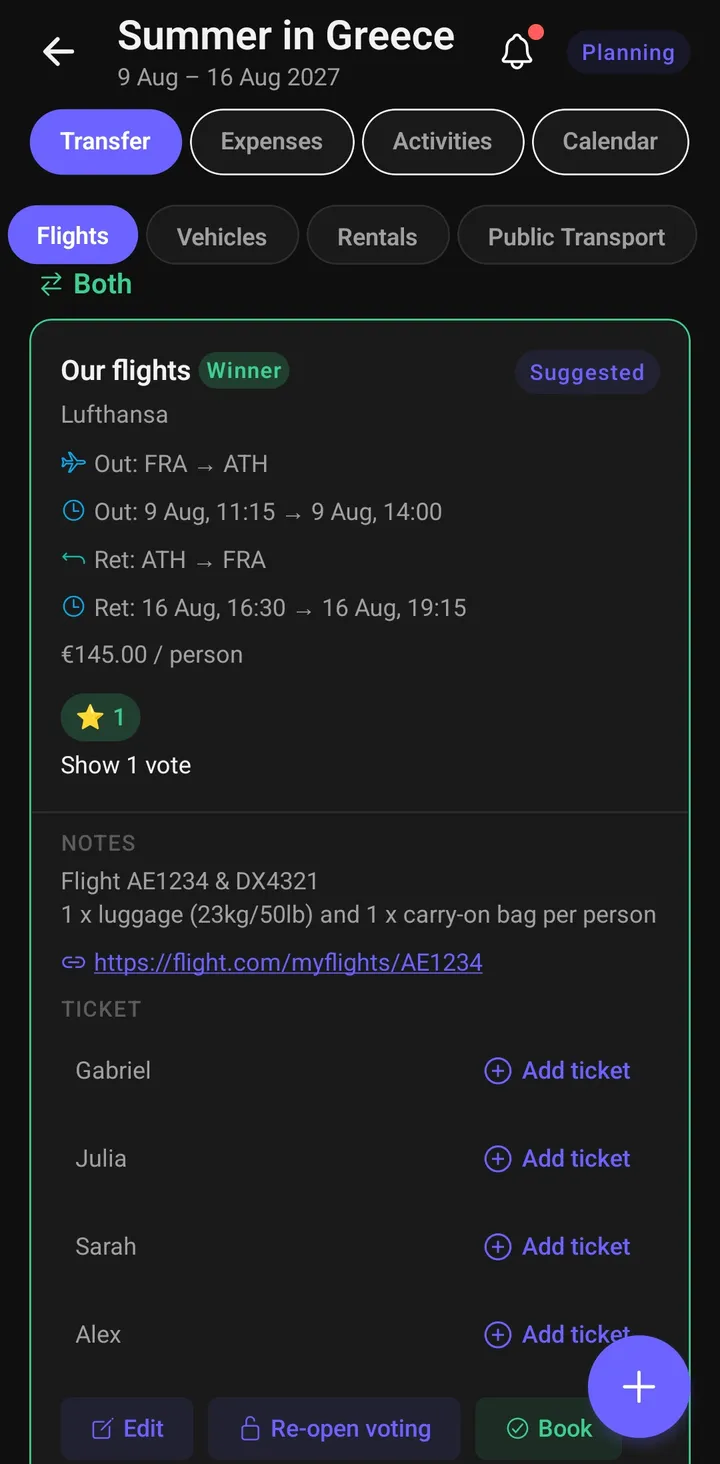
Four kinds of transfer, one screen
The Transfer section has a segment for each way a group actually travels:
- Flights - suggest options, let the group vote with the same five-tier system used for activities, record the booking once it's made, and assign who's on which flight.
- Own cars - add the cars people are driving, mark the driver, and assign passengers so everyone knows who's riding with whom and which car has a spare seat.
- Rental cars - keep the rental company, pick-up and drop-off details, booking reference, and cost where the whole group can find them, not just the person who booked.
- Public transport - trains, coaches, ferries, and buses: route, times, operator, booking reference, and a link to the operator's site, all in one card per journey. Anyone can join or leave a journey, so the group can see who's actually travelling on it.
Everything that has a date lands on the shared trip calendar automatically, so the itinerary builds itself as bookings come in.
Tickets attached to the journey they belong to
A boarding pass is useless in a group chat from three weeks ago. In Vacationist, tickets live on the transfer:
- Flight tickets and boarding passes - one per passenger, per flight. You upload your own, or the organizer uploads on your behalf if they did the booking. Replace it anytime the airline reissues one.
- Public transport tickets - any trip member can add the group's train or coach tickets to the journey card, so the person holding the booking isn't the only one who can pull it up at the barrier.
Uploaded tickets go into private, access-controlled storage - only your trip's members can open them, and only the person who uploaded a ticket (or the trip organizer) can replace or remove it. Images and PDFs up to 10 MB.
Costs that flow into the group balance
Transfers are usually the biggest line items on a trip, and they're rarely split evenly - one person books the rental, two people are on a pricier flight, someone drives their own car and everyone chips in for fuel. Log any of it as an expense with a custom split, and it nets out against everything else the group owes. Attach the receipt to the expense while you're there.
Each flight, rental, and public-transport entry keeps its own currency - a price you entered in dollars stays in dollars even if someone switches the trip's currency later. And any of them can be marked a business cost, so a work flight or rental car flows straight into the business expense summary alongside your expenses. All of it feeds the trip's cost total and your personal share.
Plan your next group trip with Vacationist
Vote on activities, split expenses and attach receipts, and keep everyone in sync - free, no ads, and friends can join without an account. Available on iOS, Android, and the web.
Frequently asked questions
Can the group vote on which flight to book?
Yes - flights use the same five-tier voting as activities, so the group can weigh options before anyone books. Rental cars, own cars, and public transport don't have voting; they're for recording arrangements the group has already agreed on.
Who can see and upload tickets?
Every member of the trip can view a ticket attached to a transfer. Uploading, replacing, or deleting a ticket is limited to the person it belongs to and the trip organizer - so the organizer can handle tickets for a group booking without anyone losing control of their own.
Are uploaded tickets encrypted like travel documents?
Tickets are kept in private, access-controlled storage restricted to your trip's members - a different mechanism from the encrypted travel document vault, which additionally encrypts passport and ID fields at rest behind your device's biometrics. Use the document vault for passports; use ticket uploads for boarding passes and rail tickets.
Does it work offline?
Yes. Like the rest of Vacationist, transfer details you've already opened are available offline, and changes you make sync when you're back on a connection - useful when you're adding a booking reference from a train with no signal.